It’s the Google of your embroidery designs.
You own hundreds of them. Maybe thousands. Spread across folders named new stuff, new stuff 2 and DOWNLOADS FINAL, on two drives and a memory stick in a drawer — and half of them still sitting inside the zip they arrived in.
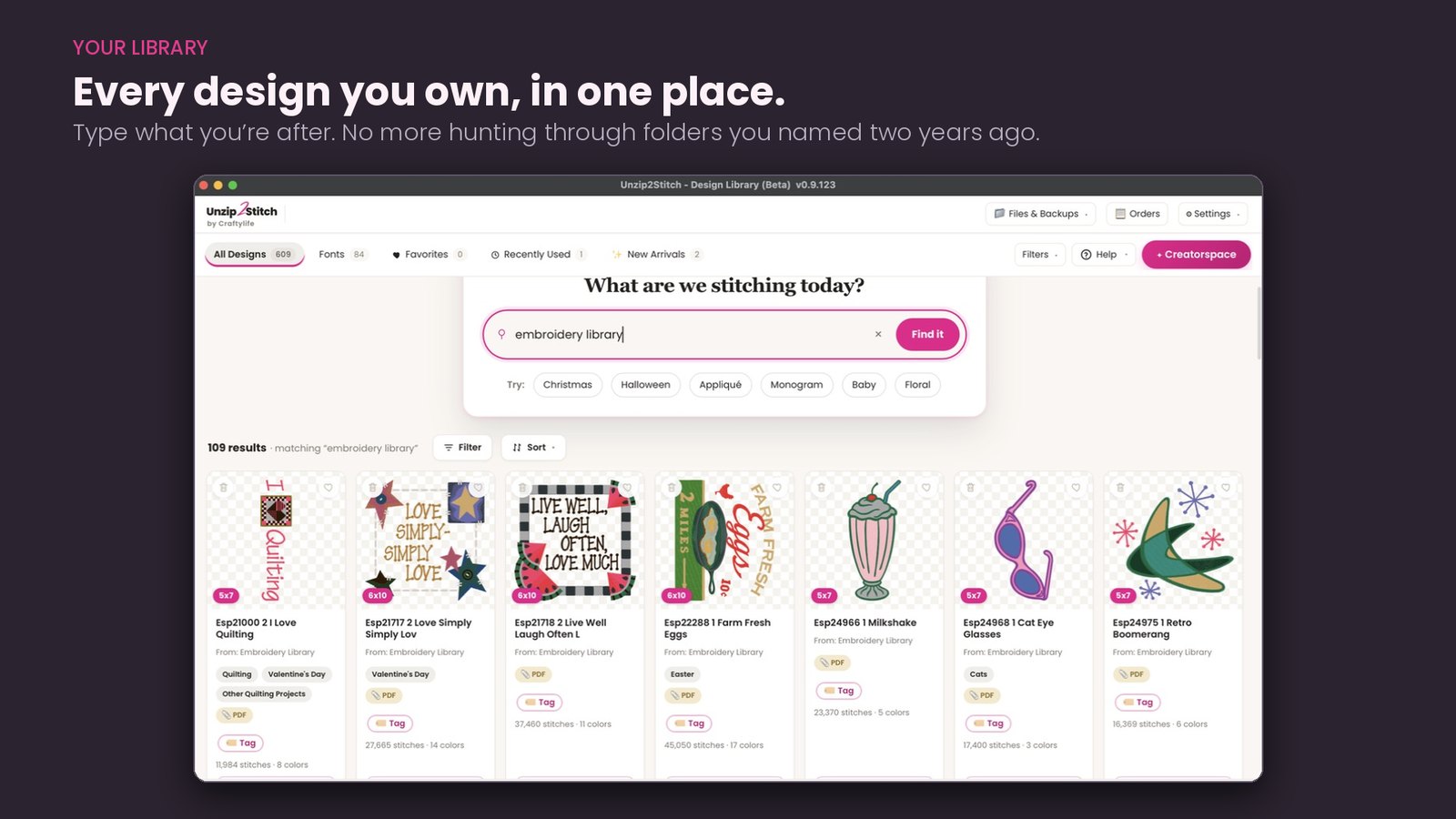
Point Unzip2Stitch at your folders. It opens the zips for you, including the zips hiding inside zips that font bundles love, and turns the whole lot into something you can search. Type a word. Or narrow by hoop size, technique or subject and watch every other count move with you — 109 designs down to 25 with one tick. Every card shows the real stitch count, color count and finished size before you open anything.
Favorites, tags, collections, recently used, and a New Arrivals shelf for the things you bought last night and already forgot about.
It runs natively on a Mac. Not in a workaround.
Embroidery has spent years being a Windows-only hobby. The usual advice to a Mac owner is to buy Windows, install a virtual machine, and run embroidery software inside a pretend PC on a real computer they already paid for.
Unzip2Stitch is a real Mac app. It is signed and notarized by Apple, so it opens the way anything else on your Mac opens — no security warnings, no unidentified-developer box, nothing to talk yourself past. It runs on Apple Silicon Macs — M1 and newer — on macOS 11 Big Sur or later. If you are on an older Intel Mac, email me before you buy and we will check it together.
And it is the same program on both sides. Windows and Mac get the same tools, the same updates, on the same day. Your license moves with you if you change computers.
Bring in any stitch-file alphabet. We make magic with it.
This is the part we are proudest of. We’re not going to claim it’s the biggest font manager in machine embroidery — we’re going to claim it’s the easiest. The alphabets you already own, ready to type, without a manual.
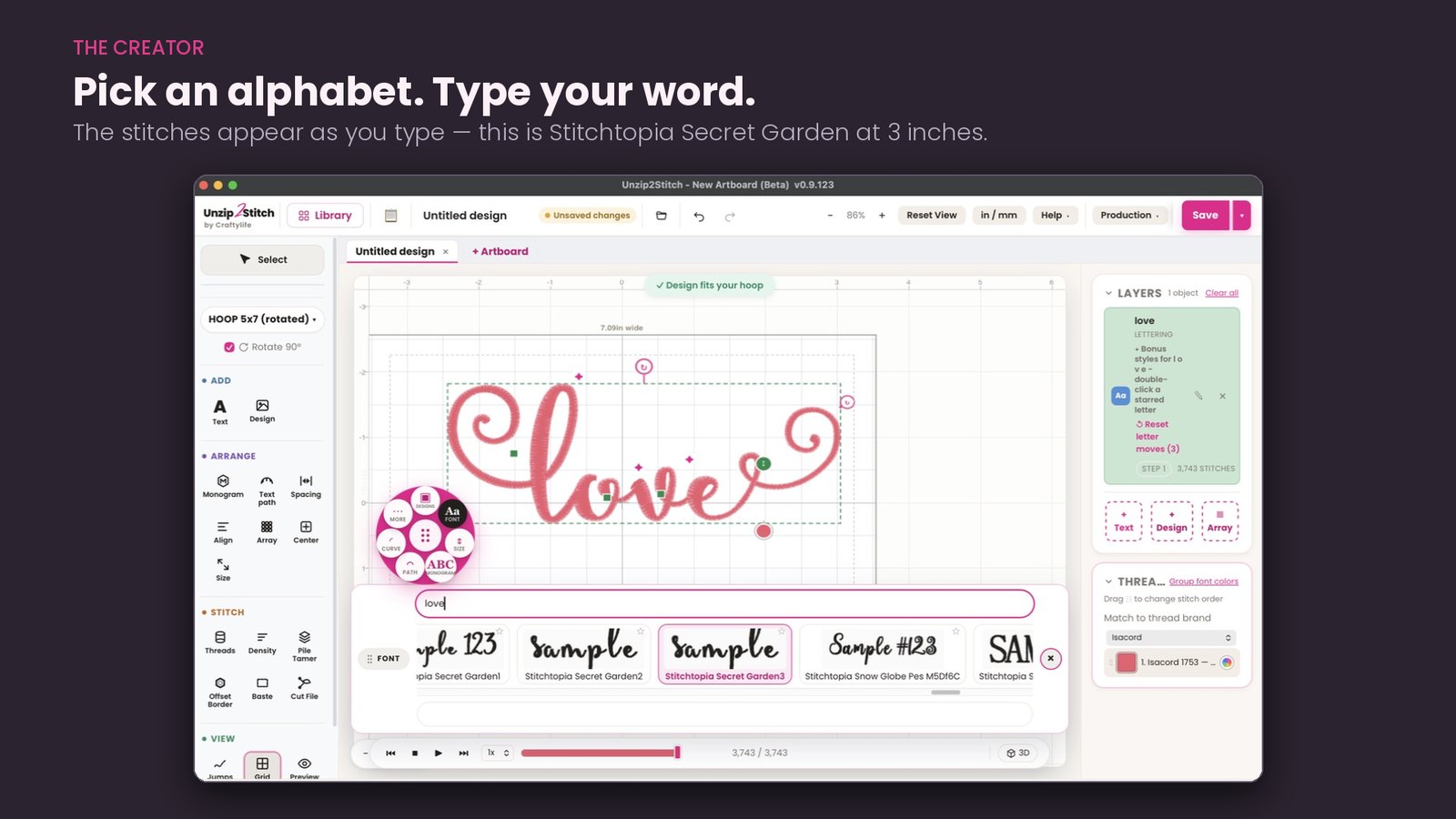
Bring in the alphabets you already own, in any stitch format — PES, DST, JEF, EXP, whatever the shop sent you, straight out of the zip. Unzip2Stitch works out which files are letters, which letters they are, and what sizes they were digitized in, and gives every alphabet its own shelf with actual letterforms on the card. Not filenames. Letters.
Then type. The stitches appear as you go, in the alphabet you picked, at a size it was really made for.
And your BX collection isn’t left out either. BX fonts only run inside Embrilliance — nothing else can stitch or preview them, and we’re not going to pretend otherwise. So Unzip2Stitch catalogs them instead: every .bx you own on its own shelf, counted and listed in one place, with a Download button to pull the file back out whenever Embrilliance wants it. And because most digitizers sell the same alphabet in PES or JEF in the same purchase, scan that copy in and the font types like any other — you’re no longer limited to just the BX version.
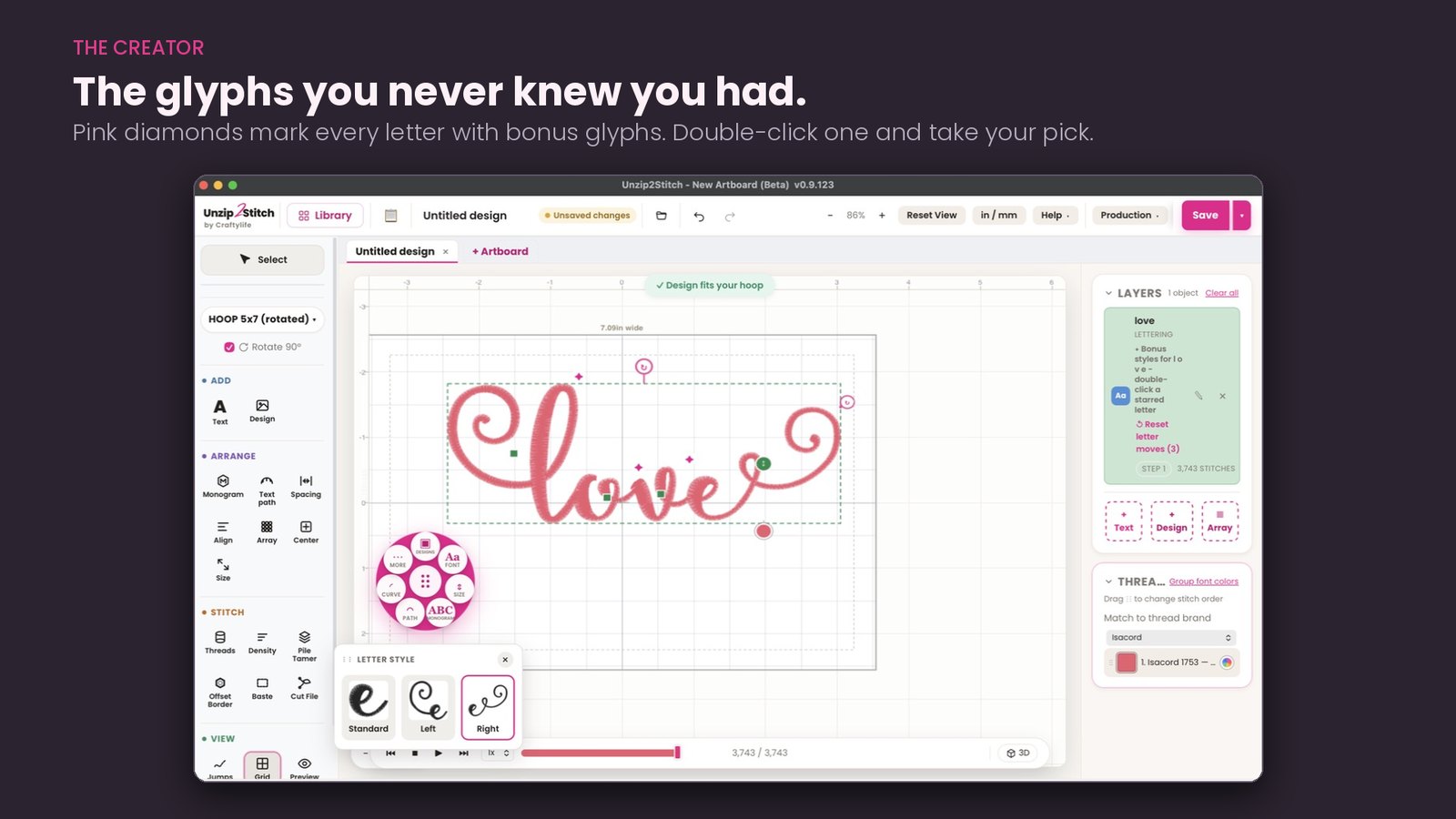
And it finds the glyphs you didn’t know you’d bought. Most script and appliqué alphabets ship with bonus glyphs — alternate letterforms, tails, connectors, beginnings and endings. Almost nobody ever finds them, because they’re buried in the pack. Unzip2Stitch puts a small pink diamond on every letter that has glyphs, right there on the design. Double-click it and take your pick.
Letter it, monogram it, put it on a curve
Curve a name, arch it, set it on a path, space it by hand or by the number. Monogram merging for the three-letter layouts. Fine-tune a single letter without touching the rest. Align a second row to the first. Reset any of it in one click.
Put the name on the design
It’s Tuesday and Billy’s shirt has to be done by Friday. You bought the cake design months ago. You own an alphabet you like. Bring both onto the same artboard, sit the name where you want it, size it to the hoop, and save it out as one file your machine will run.
That is most of what actually gets stitched — a design you already own, with a name on it. Add as many pieces as you like: a design, a name, a date, a border. Layers keep them separate, so you can move any one of them without disturbing the rest.
It is all laid out at true size inside your hoop, so what you see is what stitches. Plenty of programs will show you a design. Plenty will let you type a word. Doing both in one place, and getting one file out of it, is the part you will use every week.
Appliqué, done properly
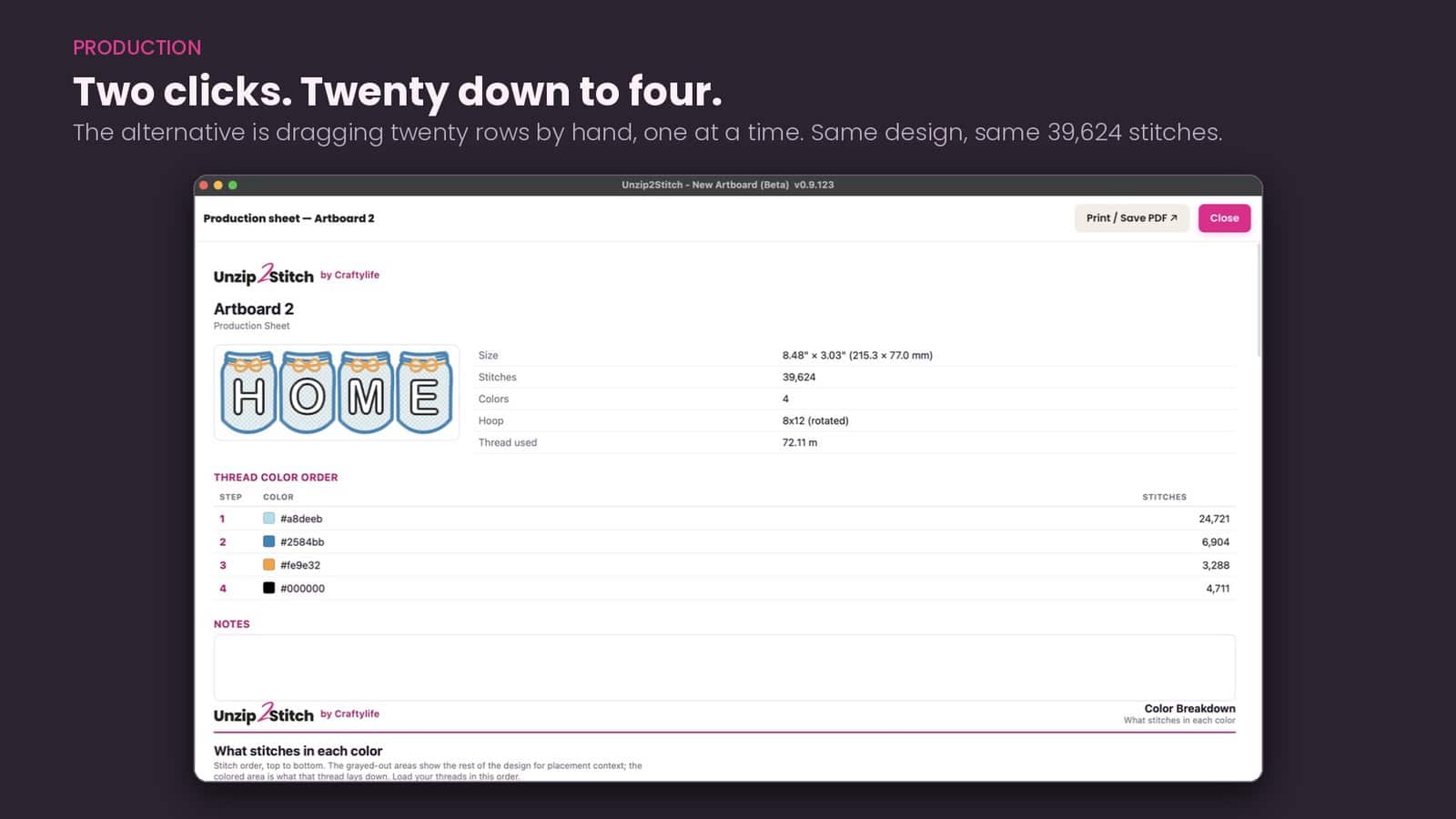
Sort the color order. Four letters in an appliqué alphabet is twenty thread changes by default — twenty stops at the machine. Group the colors and every same-colored piece stitches in one pass: four changes instead of twenty. Same design, same stitch count, two clicks. Doing that by hand means dragging twenty rows one at a time.
Cut your fabric on a Cricut or Silhouette. One click writes an SVG of every appliqué piece, at true size, offset outward from the stitch line so the fabric tucks neatly under the satin border. Adjustable, in sixteenths, for thicker fabric.
Add a satin border set out around the design and following its own shape — seven widths, six offsets.
Every format, in one save
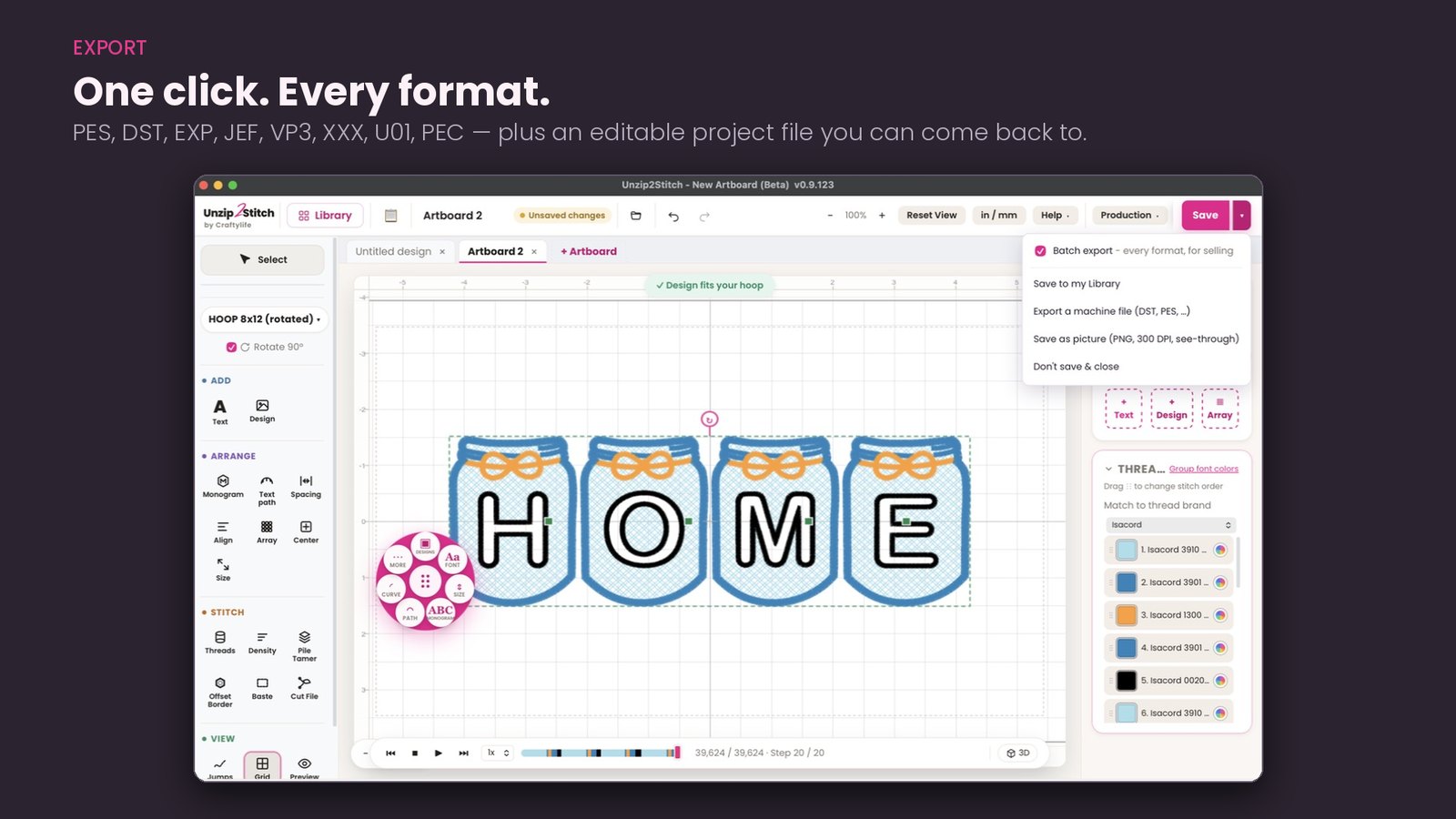
Batch export writes a file in every machine format Unzip2Stitch can make — PES, DST, EXP, JEF, VP3, XXX, U01 and PEC — from a single save. That’s what you need the day you start selling designs, because your buyers own machines you don’t.
Plus an editable project file so you can come back and change your mind, a 300 DPI transparent PNG for your mockups and listings, and thread colors matched to real brands so your color sheet names thread you can actually buy.
Edit the stitches, not just the picture
Pull compensation — widen every satin column a touch per edge so it doesn’t pinch narrow when the fabric pulls in. Six settings, and it’s the difference between a clean name on a knit and a skinny one. Lighten the density of a fill that was digitized too heavy, up to 10% fewer stitches. Cap the stitch length to your machine’s real maximum so long satins stay whole and smooth. Remove the tiny stitches under a fifth of a millimeter — the snag-prone ones that bunch and break thread.
A density map shows you where the stitches pack in tightest, the spots that pucker or snap thread, before you hoop anything. Pile Tamer lays a light fill first to press the fuzz flat on towels, fleece and minky, so your design sits crisp on top instead of sinking in. A basting box tacks your stabilizer down and pulls straight out afterwards.
Nothing changes your file until you save. Everything is reversible until then.
Know the job before you hoop it
Pick your hoop — 4×4 through 14×14 PR Jumbo, or add your own Mighty Hoop by its real stitch field — and it tells you straight away whether the design fits.
A production sheet you can hand to someone else. Finished size, stitch count, the thread color order in the order you’ll load it, meters of thread per color, and a picture of exactly what each color lays down on the fabric.
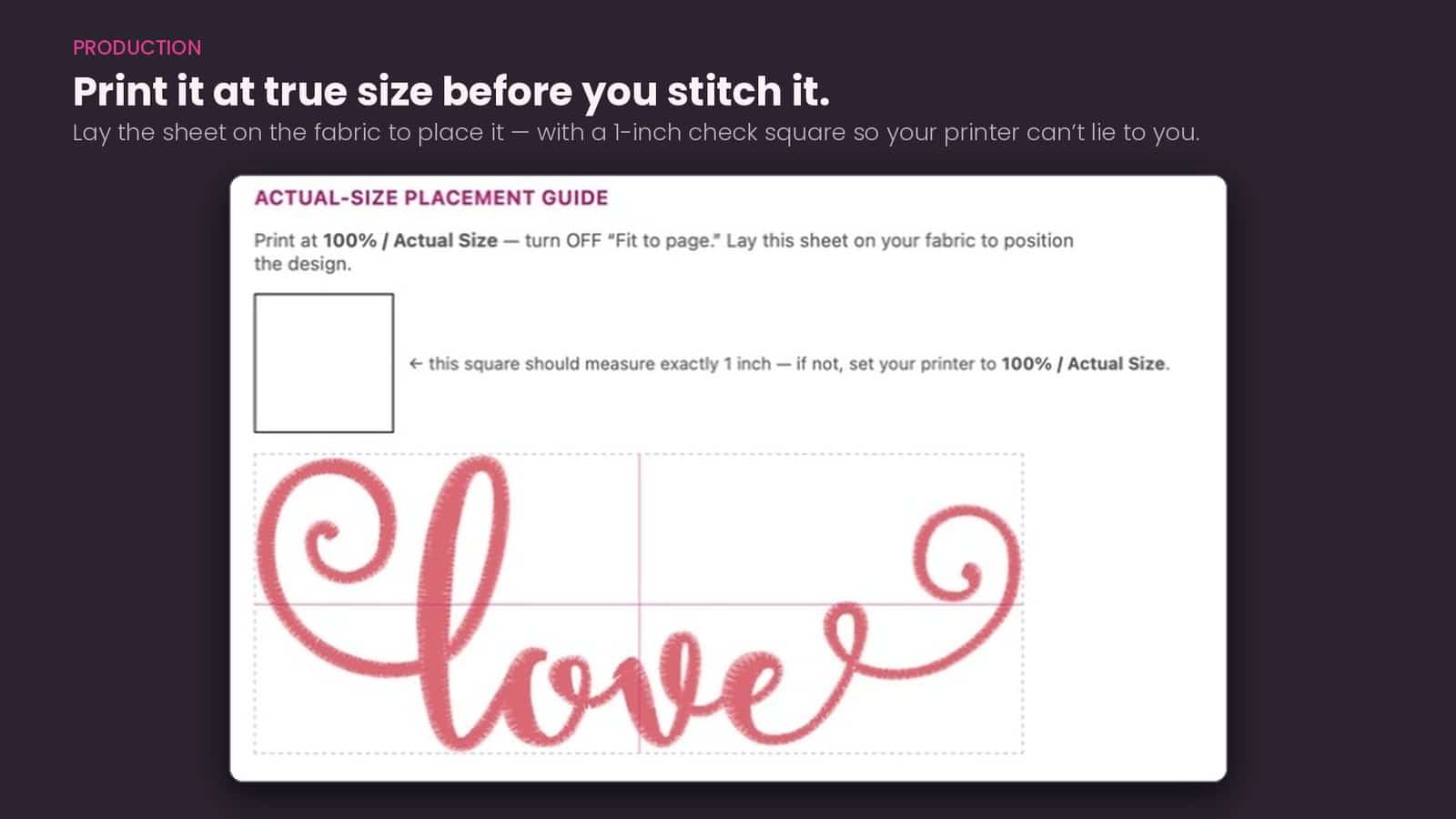
Print it at true size before you stitch it. Lay the sheet on the garment to place the design. There’s a one-inch check square on the page, so your printer can’t quietly shrink it on you.
And a catalog of everything you own
Export your whole library as a browsable, printable catalog — grouped by collection, with a picture and the details of every design, plus a spreadsheet of the lot. Your alphabets get their own list. Handy when you’re deciding what to stitch. Very handy when you’re insuring, inventorying, or just trying to prove to yourself how much of it you already have.
One program instead of five
Most embroiderers end up buying a library program, then a font add-on, then a thumbnailer, then something to convert formats, then something else to sort colors — and they still alt-tab between all of them to finish one job. Unzip2Stitch is one window: find it, letter it, size it, sort it, check it, print it, send it.
What it does not do is digitize a logo from scratch. That’s a different job and a different skill, and we’re not going to pretend otherwise.
Your files stay yours
Unzip2Stitch reads the designs already on your computer. It never uploads your files. The only things that ever leave are a quick activation check and a problem report, if you click send.
Mac (macOS 11 Big Sur or newer) and Windows. Signed and notarized by Apple, so it just opens.
Early access
This is a pre-release version, and priced like one. It works — it’s being used daily on a real library of 600-odd designs and 80-odd alphabets — but it isn’t finished, and you will find rough edges. If that’s not for you, wait for the full release at full price.
If it is: you get every update as it lands, and what you tell us goes into the next build. Quite a lot of it already has.
Reviews
There are no reviews yet.